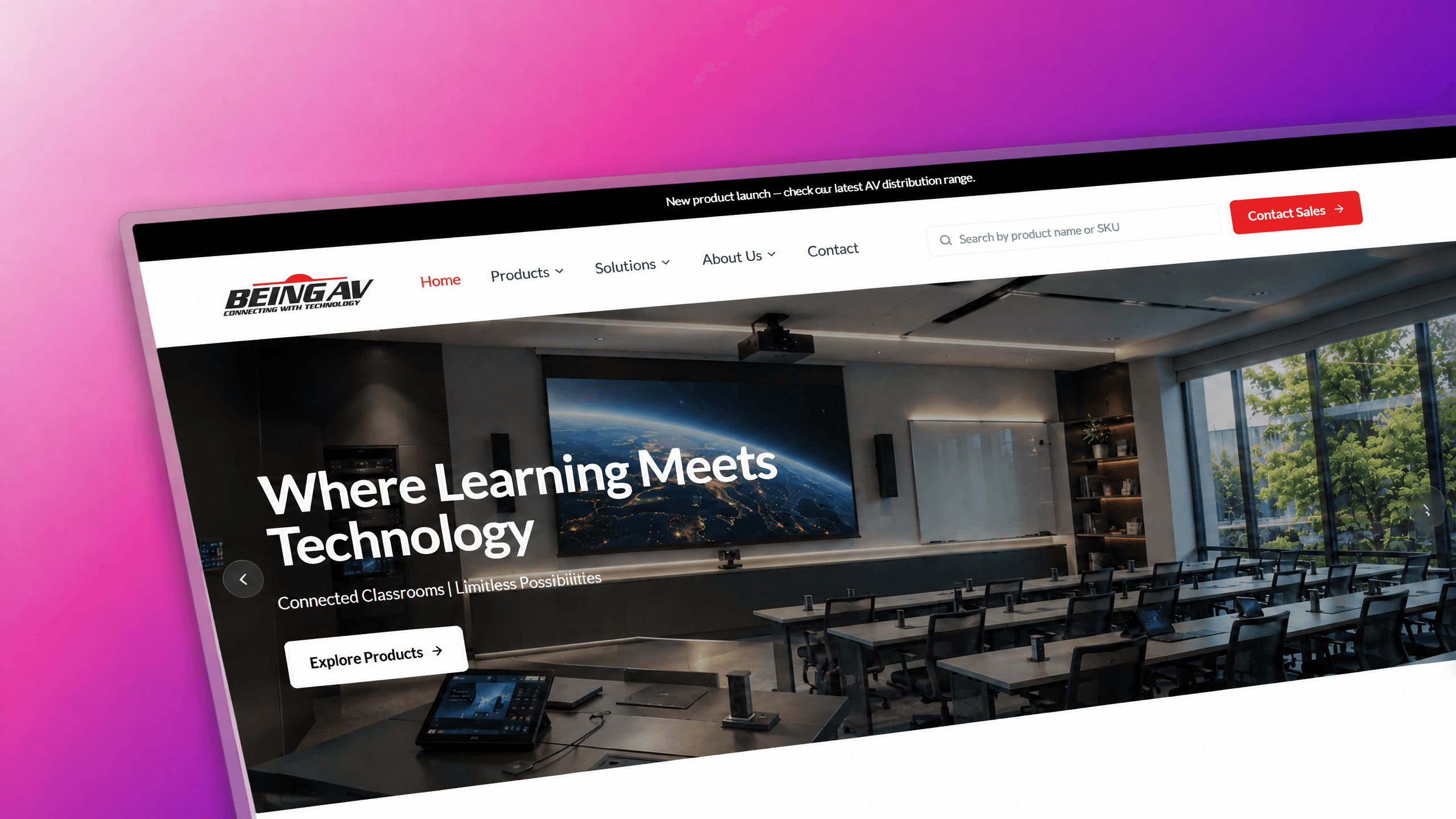
Being AV - Full-Stack Website, CMS & Inquiry CRM
Developed a full-stack business website with a custom React-based CMS and CRM dashboard, allowing administrators to manage website content, products, banners, blogs, pages, media, and customer inquiries from a centralized platform.
Timeline
2026
Role
Full Stack Developer
Team
Individual
Status
CompletedTechnology Stack
Key Challenges
- Custom CMS Development
- Dynamic Content Management
- Inquiry CRM
- Media Management
Key Learnings
- CMS Architecture
- CRM Development
- REST API Design
- Dynamic Frontend Architecture
- Production Deployment
Being AV: Full-Stack Website, Custom CMS & Inquiry CRM
Overview
Being AV is a modern, content-driven business website developed using Next.js, TypeScript, Node.js, Express.js, MongoDB, and Cloudinary.
The project was built with a strong focus on scalability and content management. Instead of keeping website content hardcoded inside the frontend, a custom React-based admin dashboard was developed to function as both a CMS and Inquiry CRM.
The dashboard allows administrators to manage almost the entire website from a centralized interface, including the home page, banners, products, blogs, About Us content, pages, images, and other dynamic sections.
The system also includes an inquiry management module that allows the business to receive, view, manage, and track inquiries submitted through the website.
Website Features
- Modern and responsive business website
- Next.js-based frontend
- Fully responsive design for desktop, tablet, and mobile
- Dynamic homepage sections
- Dynamic hero banners
- Product showcase and product information
- Blog section
- About Us pages
- Dynamic content-driven pages
- Contact and inquiry forms
- SEO-friendly page structure
- Optimized images and media
- Dynamic content fetched through backend APIs
Custom CMS Dashboard
A custom React-based admin dashboard was developed to give administrators complete control over the website content.
The CMS eliminates the need to modify frontend code whenever website content needs to be updated.
Content Management
Administrators can manage various website sections directly from the dashboard.
- Manage homepage content
- Manage hero banners
- Manage products
- Manage product information
- Manage blogs
- Manage About Us content
- Manage website pages
- Manage images and media
- Create, update, and delete content
- Publish and update content dynamically
- Centralized content management
The frontend consumes this content through REST APIs and dynamically renders the latest data on the public website.
Inquiry CRM
Alongside the CMS, the admin dashboard includes a dedicated inquiry management system.
Website visitors can submit inquiries through the public website, which are then stored in MongoDB and made available to administrators through the dashboard.
CRM Features
- Capture website inquiries
- View inquiry details
- Manage incoming inquiries
- Centralized inquiry dashboard
- Track customer requests
- Review submitted contact information
- Manage inquiry records
- Separate inquiry management from website content management
This provides the business with a simple CRM workflow without requiring a separate third-party CRM platform.
Admin Dashboard
The dashboard was designed as a centralized control panel for both website management and business inquiries.
Dashboard Features
- Secure admin authentication
- Dashboard overview
- CMS management modules
- Inquiry management
- Product management
- Blog management
- Banner management
- Page management
- Media management
- Complete CRUD operations
- Responsive admin interface
- API-driven content management
The dashboard is designed for non-technical users, allowing them to update website content without directly interacting with the source code or database.
Media Management
Cloudinary was integrated for handling image uploads and media assets.
Administrators can upload images directly from the dashboard and associate them with different website sections such as products, banners, blogs, and pages.
Media Features
- Dashboard-based image uploads
- Cloudinary integration
- Dynamic image URLs
- Image management for CMS content
- Optimized media delivery
- No dependency on local server storage
Dynamic Website Architecture
One of the key aspects of the project was making the public website content-driven.
Instead of hardcoding every section, the frontend retrieves dynamic data from the backend APIs.
For example, administrators can update a product or homepage banner from the dashboard, and the updated content can then be reflected on the public website without requiring changes to the frontend source code.
This approach makes the website easier to maintain and provides a scalable foundation for adding new CMS modules.
Architecture
The application follows a full-stack architecture consisting of a Next.js frontend, Node.js/Express.js backend, MongoDB database, and Cloudinary media storage.
Frontend
The frontend is built using Next.js and TypeScript.
- Next.js
- TypeScript
- React.js
- Tailwind CSS
- Responsive UI
- Dynamic content rendering
- REST API integration
- SEO-friendly architecture
Backend
The backend provides APIs for authentication, CMS operations, inquiries, products, blogs, pages, and other dynamic website data.
- Node.js
- Express.js
- REST APIs
- Authentication
- Authorization
- CRUD operations
- Request validation
- Media integration
Database
MongoDB is used as the primary database for storing website content and business data.
- MongoDB
- Mongoose
- Dynamic content models
- Product data
- Blog data
- Page content
- Inquiry records
- Administrative data
Media Storage
Cloudinary is used for storing and serving uploaded website images.
- Cloudinary
- Image uploads
- Media URLs
- CMS media integration
Challenges
Building a Custom CMS
One of the primary challenges was designing a CMS that could manage different types of website content while remaining simple for non-technical administrators.
The system was structured around reusable CRUD patterns so that different content modules could be managed through a consistent dashboard interface.
Making the Website Fully Dynamic
The website contains multiple sections that need to be updated regularly.
Instead of hardcoding this content, API-driven dynamic rendering was implemented so that the frontend could consume and display data managed through the CMS.
Combining CMS and CRM
The dashboard needed to serve two different purposes:
- Managing website content.
- Managing customer inquiries.
Both workflows were integrated into a single administrative interface while keeping their data and functionality logically separated.
Media Management
Products, banners, blogs, and other pages require images. Cloudinary was integrated to provide reliable media storage and delivery while keeping the application server lightweight.
Impact
- Reduced dependency on developers for routine website updates
- Enabled non-technical users to manage website content
- Centralized website content management
- Centralized customer inquiry management
- Simplified product and blog updates
- Made homepage and other page sections dynamically manageable
- Improved the overall content publishing workflow
- Created a scalable foundation for future CMS and CRM modules
Tech Stack
Frontend
- Next.js
- TypeScript
- React.js
- Tailwind CSS
Backend
- Node.js
- Express.js
- REST APIs
Database
- MongoDB
- Mongoose
Media & Storage
- Cloudinary
Authentication & Security
- Authentication
- Authorization
- Protected admin routes
- Request validation
Key Learnings
- Designing a scalable custom CMS architecture
- Building reusable CRUD-based admin modules
- Developing a lightweight CRM for inquiry management
- Building dynamic websites driven by API-based content
- Designing RESTful APIs
- Working with MongoDB and Mongoose
- Integrating Cloudinary for production media management
- Managing frontend and backend communication
- Building responsive admin dashboards
- Structuring full-stack applications for scalability
- Deploying and maintaining production applications
Conclusion
Being AV was developed as a complete full-stack digital platform rather than a traditional static business website.
The combination of a Next.js frontend, Node.js and Express.js backend, MongoDB database, Cloudinary media management, and a custom React-based CMS/CRM dashboard provides the business with complete control over its digital content and customer inquiries.
The resulting system allows administrators to manage products, banners, blogs, pages, About Us content, and other website sections while also handling customer inquiries from a single centralized dashboard.